
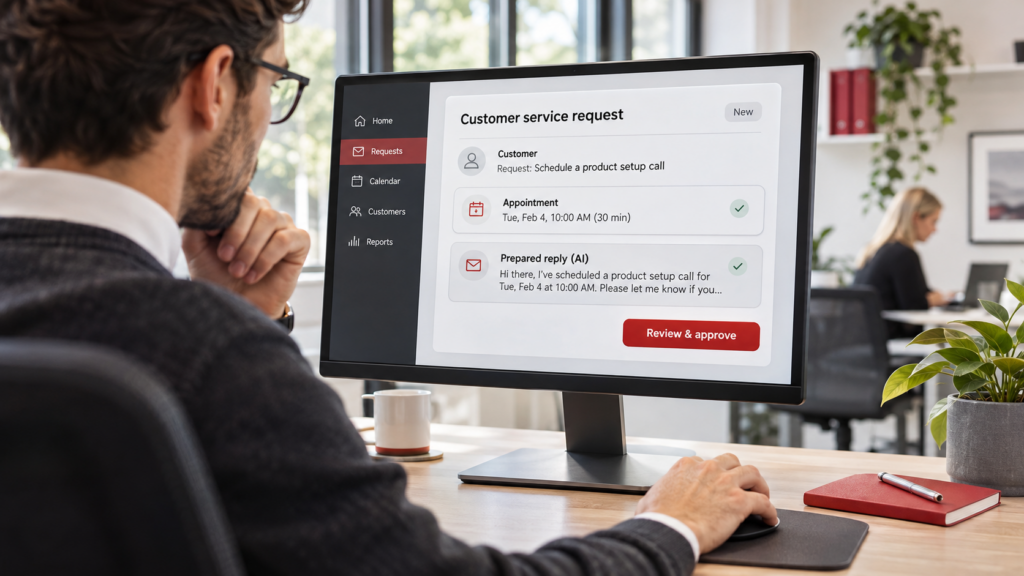
AI agents are expanding what businesses can do with AI. Beyond answering questions or drafting content, they can use connected tools to help complete tasks, such as preparing a service request or checking appointment availability.
But what could that look like in your business, and how do you get started securely?
Just Solutions’ David Wolf and Matt Isaman offer a practical look at where AI agents can help and how businesses can get started securely.
See What AI Agents Could Look Like in Your Business
Watch David Wolf, Vice President, and Matt Isaman, AI Architect and Engineer, explain how AI agents can help with everyday tasks, where human judgment matters, and what to consider before connecting them to company systems.
Moving From a Response to a Result
An AI agent uses AI and connected tools to work toward a goal. Depending on its configuration, it can look up information in business systems and take actions within limits set by the business.
Matt explains the distinction through an illustrative customer service request. A customer sends an email asking whether a technician can come out tomorrow. A chatbot can help write a reply, but much of the preparation still falls on an employee.
“We still find the customer, we create the work order, we check who’s free, and then we got to copy, paste, and send,” Matt explains.
An agent could be configured to handle parts of that preparation across connected systems. For example, it could:
- Find the customer’s account and relevant service information.
- Check technician availability for the requested day.
- Prepare a work order and draft the customer’s reply.
- Present the proposed appointment for a dispatcher to approve.
As Matt describes it, the agent’s job is to turn incoming requests into “jobs that are ready for a person to approve.”
That gives the employee something concrete to evaluate, with less time spent gathering information. The capabilities available will depend on the tools involved and how they’re connected.
When Is a Simple Workflow Enough?
Adding an AI agent isn’t always the best way to improve a process.
“If the steps are the same every time, a workflow is probably enough,” Matt says. “And it’s cheaper and more predictable.”
A recurring reminder, for example, may only need a scheduled automation. A process that follows clear rules may work well without AI interpreting anything.
The situation changes when incoming information varies. Customers don’t all write their requests the same way. Some leave out important details. Others reply to an old email about a completely different issue.
Matt describes this as work that has “context and background,” often requiring information from different platforms.
An agent could help interpret those requests and gather the relevant details. But the business still needs to define what happens when information is incomplete or ambiguous.
In the service request example, two customers have similar names. The agent shouldn’t select one just to keep the process moving.
“A good agent doesn’t just guess,” Matt says. “It stops and asks.”
Building that pause into the process helps prevent an uncertain match from becoming an incorrect work order or a message sent to the wrong customer.
Put Security and Oversight Into the Process
For an agent to help with business tasks, it may need access to company systems. That makes security part of planning the workflow from the beginning.
David encourages businesses to consider the authority they’re granting.
“What do I want it to be able to do?” he asks.
An agent that helps schedule appointments may need to read calendar availability. It may not need permission to cancel existing appointments. An agent reviewing invoices may need access to payment records without having authority to change a customer’s credit status.
Before connecting an agent, establish:
- Which information and systems it needs to access.
- What it can change without approval.
- Which actions require a person to review them.
- Who owns the process and can remove the agent’s access.
“Could you stop the agent, remove its access today?” David asks.
Someone within the company should be able to answer that question. Work with your IT team or technology partner to configure access appropriately. Avoid shortcuts such as shared administrator logins or passwords pasted into prompts.
Make Human Approval Meaningful
Requiring approval is useful only if the person reviewing an action understands what will happen.
In Matt’s service request example, the dispatcher reviews the proposed customer response alongside the appointment details. The review should make clear “who gets the message, which customer, what job, what time, and whether anything extra was promised,” he explains.
That allows the dispatcher to check the commitment before it reaches the customer.
Once approved, the agent could carry out the authorized steps and record what happened. Matt describes that record as “a digital thread into the historical activity” that helps the business investigate mistakes and improve the process.
Human judgment also matters when the information in a system doesn’t tell the whole story.
David gives the example of an unpaid invoice. The customer may be waiting for a project to be completed before paying. Acting on the overdue status alone could create a problem that an employee familiar with the account would recognize immediately.
“Responsible AI is a combination of the AI and real intelligence,” David says.
AI can help prepare the information. Your team still brings the experience needed to understand what it means and decide how to proceed.
Start With One Task Worth Improving
Businesses don’t need to begin with a project spanning every department.
“Choose one useful task, something that you’re doing repetitively,” David advises.
Look for work that consumes time each week, especially when an employee has to gather information before making a decision. Preparing a recurring report or reviewing submissions for missing details could provide a manageable starting point.
Use these steps to explore your first application:
- Choose a manageable task. Pick work with a clear result that someone can review. Assign a person to own the process and handle exceptions.
- Map the process. Identify the information needed and where human judgment matters. Note any sensitive data involved.
- Set access and approval limits. Give the agent only the permissions the task requires. Define when it should pause and ask for help.
- Test and measure. Start with a limited scope. Compare the time saved with the effort needed to review and correct its work, along with the cost of running it.
The benefit should be visible in the overall process. If an agent produces work quickly but requires extensive cleanup, the approach may need adjustment.
For David, the goal is to give employees time back. Less time spent on routine preparation creates more room for work that needs their expertise or personal attention.
Find Your First AI Workflow
“You don’t need to become an AI engineer to do this,” David says.
Our Find Your First AI Workflow worksheet can help you put these steps into practice. Use it with your team to identify where time is being spent and outline a task worth improving.
Work through the information an agent would need and the points where someone should review its work. You’ll have a starting point for discussing what’s possible with your IT team or technology partner.
Put AI Agents to Work for Your Business
Your first AI agent needs a clear job. Start with a task your team understands, decide what access it needs, and establish where a person should review its work.
Just Solutions can help you identify a useful starting point and work through the technology and security requirements.
Have a process in mind? Let’s talk about how AI agents could help your business.